

New NSE7_SSE_AD-25 Test Materials & Valid NSE7_SSE_AD-25 Test Engine
NSE7_SSE_AD-25 Updated Exam Dumps [2026] Practice Valid Exam Dumps Question
NEW QUESTION # 12
Which two deployment methods are used to connect a FortiExtender as a FortiSASE LAN extension?
(Choose two.)
- A. Configure an IPsec tunnel on FortiSASE to connect to FortiExtender.
- B. Enable Control and Provisioning Wireless Access Points (CAPWAP) access on the FortiSASE portal.
- C. Enter the FortiSASE domain name in the FortiExtender GUI as a static discovery server
- D. Connect FortiExtender to FortiSASE using FortiZTP
Answer: C,D
Explanation:
There are two deployment methods used to connect a FortiExtender as a FortiSASE LAN extension:
* Connect FortiExtender to FortiSASE using FortiZTP:
* FortiZero Touch Provisioning (FortiZTP) simplifies the deployment process by allowing FortiExtender to automatically connect and configure itself with FortiSASE.
* This method requires minimal manual configuration, making it efficient for large-scale deployments.
* Enter the FortiSASE domain name in the FortiExtender GUI as a static discovery server:
* Manually configuring the FortiSASE domain name in the FortiExtender GUI allows the extender to discover and connect to the FortiSASE infrastructure.
* This static discovery method ensures that FortiExtender can establish a connection with FortiSASE using the provided domain name.
References:
FortiOS 7.6 Administration Guide: Details on FortiExtender deployment methods and configurations.
FortiSASE 23.2 Documentation: Explains how to connect and configure FortiExtender with FortiSASE using FortiZTP and static discovery.
NEW QUESTION # 13
Refer to the exhibit. The daily report for application usage for internet traffic shows an unusually high number of unknown applications by category.
What are two possible explanations for this? (Choose two.)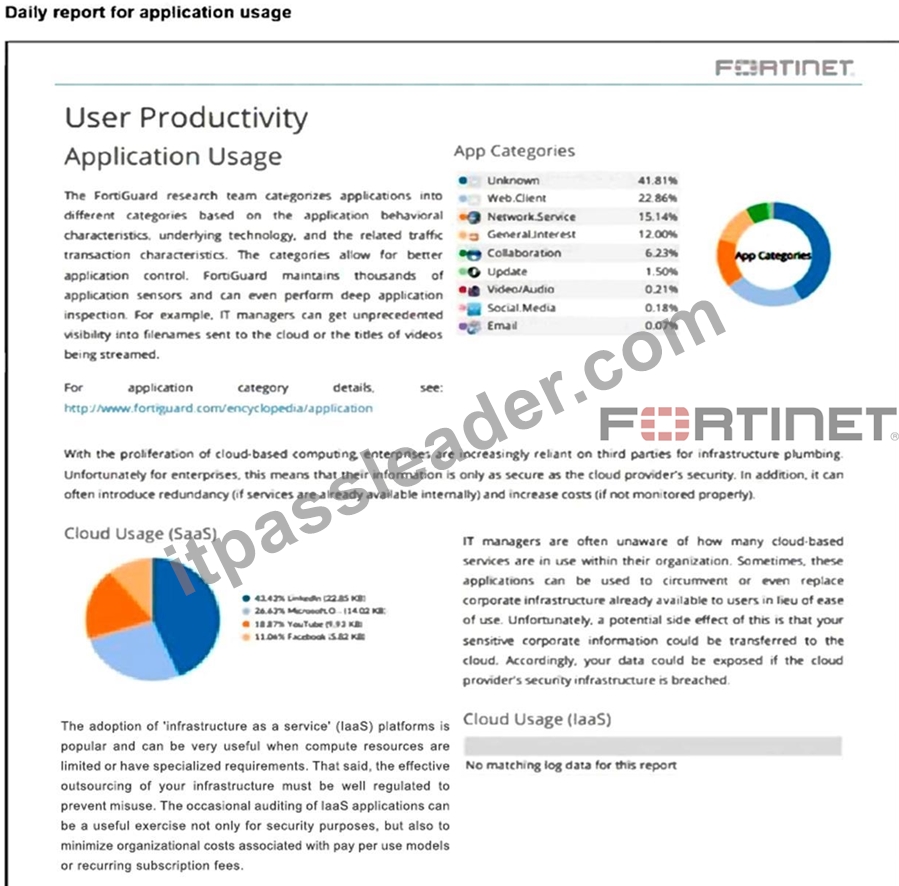
- A. The inline-CASB application control profile does not have application categories set to Monitor.
- B. The private access policy must be to set to log Security Events.
- C. Deep inspection is not being used to scan traffic.
- D. Certificate inspection is not being used to scan application traffic.
Answer: C,D
Explanation:
A high percentage of unknown applications often indicates that encrypted traffic is not being properly inspected. Without certificate inspection or deep inspection, FortiSASE cannot decrypt and analyze HTTPS traffic to identify applications, resulting in them being classified as
"unknown."
NEW QUESTION # 14
A customer configured the On/off-net detection rule to disable FortiSASE VPN auto-connect when users are inside the corporate network. The rule is set to Connects with a known public IP using the company's public IP address. However, when the users are on the corporate network, the FortiSASE VPN still auto-connects.
The customer has confirmed that traffic is going to the internet with the correct IP address.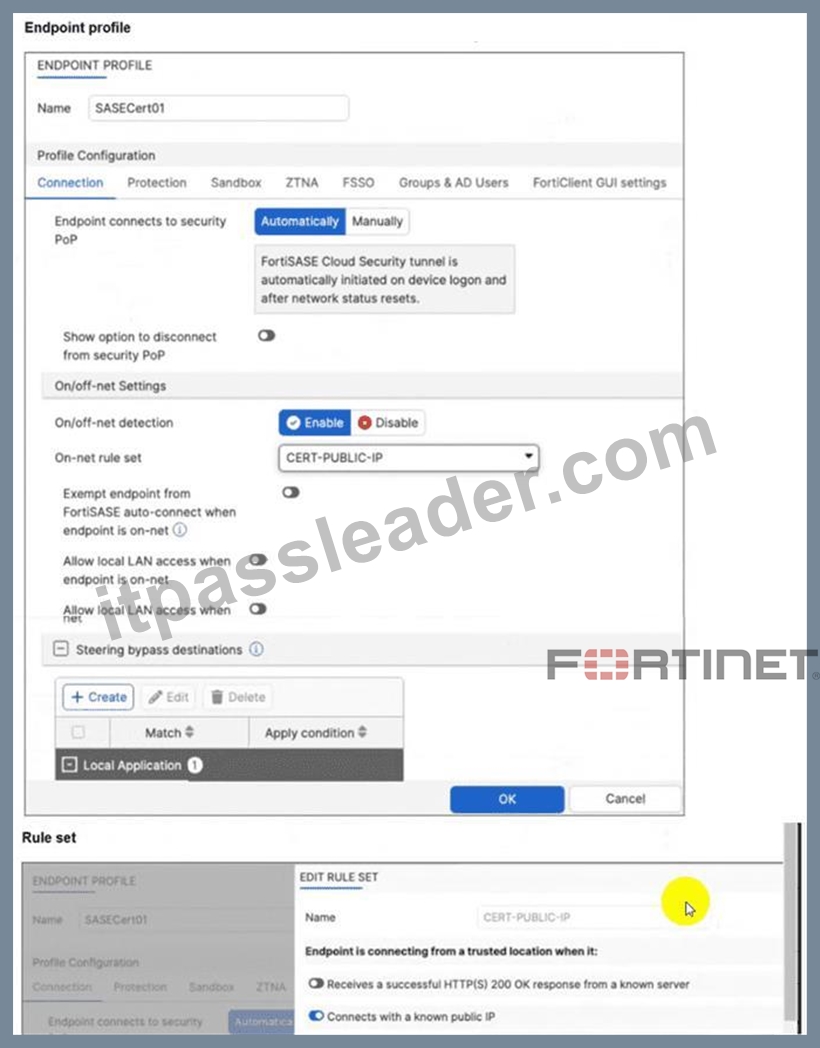
Which configuration is causing the issue? (Choose one answer)
- A. Is connected to a known DNS server should be enabled and configured.
- B. Exempt endpoint from FortiSASE auto-connect is disabled when it should be enabled.
- C. The On-net rule set configuration is incorrect.
- D. Allow local LAN access when endpoint is on-net is disabled when it should be enabled.
Answer: B
Explanation:
The FortiSASE On/off-net detection feature is a two-part configuration designed to optimize bandwidth and user experience by determining when a device is in a trusted environment.
* Rule Set Definition: The first part involves defining what constitutes an "on-net" or "on-fabric" status.
In this scenario, the customer successfully configured a rule set named CERT-PUBLIC-IP using the Connects with a known public IP detection type. This tells FortiSASE that if the endpoint's public WAN IP matches the corporate gateway, it is considered to be on the corporate network.
* Profile Exemption Logic: Defining the rule set is not enough to stop the VPN connection. Within the Endpoint Profile (under the Connection tab > On/off-net Settings), there is a specific toggle labeled Exempt endpoint from FortiSASE auto-connect when endpoint is on-net (or in some versions, Bypass FortiSASE when endpoint is on-net).
* Exhibit Analysis: Looking at the provided exhibit (image_57097d.jpg), the "Exempt endpoint from FortiSASE auto-connect..." toggle is clearly disabled (switched to the left).
* Root Cause: Because this toggle is disabled, FortiClient identifies that it is "on-net" based on the IP rule, but it has no instruction to skip the VPN connection. Consequently, the "Automatically" initiate tunnel setting remains the dominant instruction, causing the VPN to connect regardless of the network location.
To resolve the issue, the administrator must enable the Exempt endpoint from FortiSASE auto-connect when endpoint is on-net option in the SASECert01 profile.
NEW QUESTION # 15
Refer to the exhibit.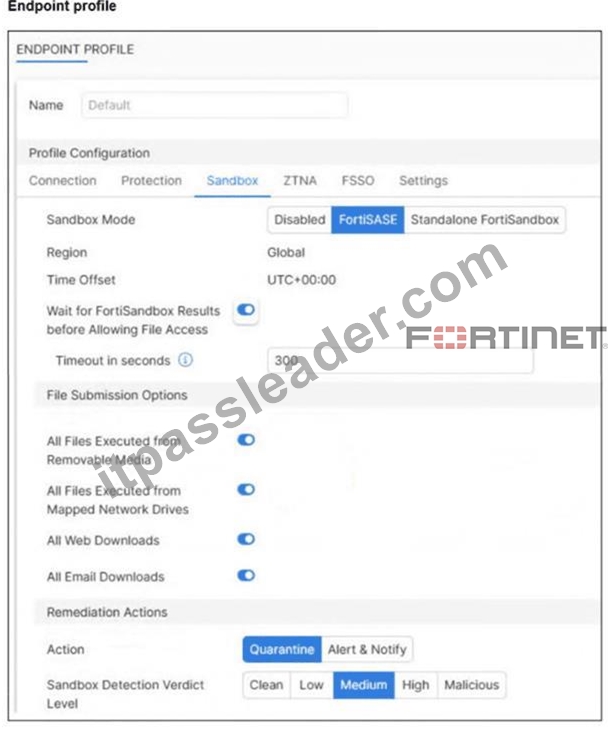
Based on the configuration shown, in which two ways will FortiSASE process sessions that require FortiSandbox inspection? (Choose two answers)
- A. All files executed on a USB drive will be sent to FortiSandbox for analysis.
- B. FortiClient quarantines only infected files that FortiSandbox detects as medium level.
- C. All files will be sent to an on-premises FortiSandbox for inspection.
- D. Only endpoints assigned a profile for sandbox detection will be processed by the sandbox feature.
Answer: A,D
Explanation:
The exhibit (image_595357.jpg) illustrates the Sandbox configuration tab within a FortiSASE Endpoint Profile. This profile dictates how the managed FortiClient agent handles suspicious files and interacts with the sandbox service.
* Profile-Based Enforcement: In the FortiSASE architecture, security features are not applied globally by default; they are enabled through specific profiles assigned to endpoints. Therefore, the sandbox inspection and remediation logic will only be active for endpoints that have been assigned a profile where the Sandbox feature is enabled.
* Removable Media Protection: Under the File Submission Options in the exhibit, the setting All Files Executed from Removable Media is toggled on. This ensures that any file executed from a USB drive or other external storage is sent to the FortiSandbox for analysis before being permitted to run on the endpoint.
* Sandbox Mode: The Sandbox Mode is set to FortiSASE, indicating that files are sent to the integrated cloud-native sandbox rather than an on-premises appliance. This makes Option A incorrect.
* Quarantine Threshold: The Remediation Actions show that the Action is set to Quarantine for files meeting the Sandbox Detection Verdict Level of Medium. This acts as a minimum threshold; FortiClient will quarantine files identified as Medium, High, or Malicious. Option B is incorrect because it implies only medium-level files are quarantined, whereas higher-risk levels would also be blocked.
NEW QUESTION # 16
Which two advantages does FortiSASE bring to businesses with multiple branch offices? (Choose two.)
- A. it offers customizable dashboard views for each branch location
- B. It offers centralized management for simplified administration.
- C. It eliminates the need to have an on-premises firewall for each branch.
- D. It enables seamless integration with third-party firewalls.
Answer: B,C
Explanation:
FortiSASE brings the following advantages to businesses with multiple branch offices:
* Centralized Management for Simplified Administration:
* FortiSASE provides a centralized management platform that allows administrators to manage security policies, configurations, and monitoring from a single interface.
* This simplifies the administration and reduces the complexity of managing multiple branch offices.
* Eliminates the Need for On-Premises Firewalls:
* FortiSASE enables secure access to the internet and cloud applications without requiring dedicated on-premises firewalls at each branch office.
* This reduces hardware costs and simplifies network architecture, as security functions are handled by the cloud-based FortiSASE solution.
References:
FortiOS 7.6 Administration Guide: Provides information on the benefits of centralized management and cloud- based security solutions.
FortiSASE 23.2 Documentation: Explains the advantages of using FortiSASE for businesses with multiple branch offices, including reduced need for on-premises firewalls.
NEW QUESTION # 17
Refer to the exhibits.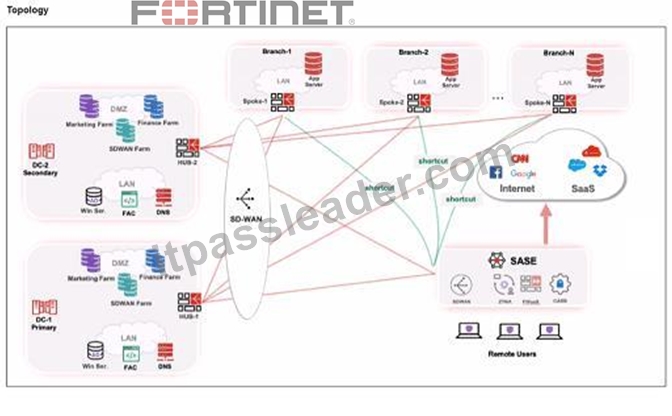
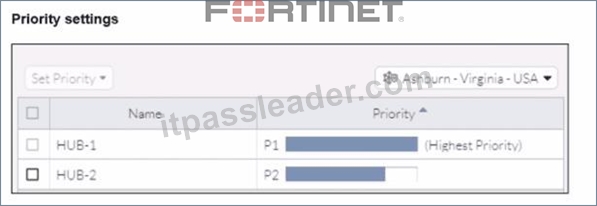
When remote users connected to FortiSASE require access to internal resources on Branch-2. how will traffic be routed?
- A. FortiSASE will use the SD-WAN capability and determine that traffic will be directed to HUB-2. which will then route traffic to Branch-2.
- B. FortiSASE will use the AD VPN protocol and determine that traffic will be directed to Branch-2 directly, using a static route
- C. FortiSASE will use the AD VPN protocol and determine that traffic will be directed to Branch-2 directly, using a dynamic route
- D. FortiSASE will use the SD-WAN capability and determine that traffic will be directed to HUB-1, which will then route traffic to Branch-2.
Answer: D
Explanation:
When remote users connected to FortiSASE require access to internal resources on Branch-2, the following process occurs:
* SD-WAN Capability:
* FortiSASE leverages SD-WAN to optimize traffic routing based on performance metrics and priorities.
* In the priority settings, HUB-1 is configured with the highest priority (P1), whereas HUB-2 has a lower priority (P2).
* Traffic Routing Decision:
* FortiSASE evaluates the available hubs (HUB-1 and HUB-2) and selects HUB-1 due to its highest priority setting.
* Once the traffic reaches HUB-1, it is then routed to the appropriate branch based on internal routing policies.
* Branch-2 Access:
* Since HUB-1 has the highest priority, FortiSASE directs the traffic to HUB-1.
* HUB-1 then routes the traffic to Branch-2, providing the remote users access to the internal resources.
References:
FortiOS 7.6 Administration Guide: Details on SD-WAN configurations and priority settings.
FortiSASE 23.2 Documentation: Explains how FortiSASE integrates with SD-WAN to route traffic based on defined priorities and performance metrics.
NEW QUESTION # 18
During FortiSASE provisioning, how many security points of presence (POPs) need to be configured by the FortiSASE administrator?
- A. 0
- B. 1
- C. 2
- D. 3
Answer: D
Explanation:
During initial provisioning, you can select fewer security sites than the maximum you are entitled to. In this case, upon each login, the FortiSASE portal prompts you to select up to the maximum number of security sites. If you add additional security sites using this prompt, then FortiSASE allows for increasing the number of security sites without FortiCare Support. FortiSASE may experience up to 10 minutes of downtime when you apply the entitlement. If any errors occur, FortiSASE cannot automatically rollback without FortiCare Support. For provisioning, you must select a minimum of two security sites for redundancy.
https://docs.fortinet.com/document/fortisase/latest/administration-guide/751044/appendix-a- fortisase-data-centers#Number
NEW QUESTION # 19
Refer to the exhibits.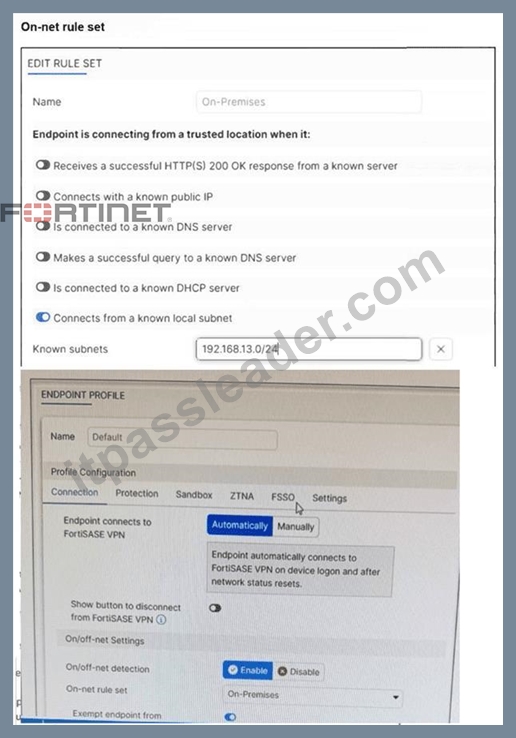
An endpoint is assigned an IP address of 192.168.13.101/24. Which action will be run on the endpoint?
(Choose one answer)
- A. The endpoint will be able to bypass the on-net rule because it is connecting from a known subnet.
- B. The endpoint will automatically connect to the FortiSASE tunnel.
- C. The endpoint will be detected as off-net.
- D. The endpoint will be exempted from auto-connect to the FortiSASE tunnel.
Answer: D
Explanation:
Based on the provided exhibits and the logic of FortiSASE On/off-net detection, the endpoint's behavior is determined by its network environment relative to the configured rules.
* Subnet Matching and Detection: The On-net rule set (named "On-Premises") is configured to identify a trusted location when the endpoint "Connects from a known local subnet". The administrator has defined the known subnet as $192.168.13.0/24$. Since the endpoint's IP address is
$192.168.13.101$, it falls within this range. Consequently, FortiClient detects the endpoint as being on- net (on-fabric).
* Action Logic (Exemption): In a FortiSASE Endpoint Profile, when On/off-net detection is enabled and an endpoint matches an "On-net" rule, the standard behavior is to exempt the endpoint from auto- connecting to the FortiSASE VPN tunnel. This design assumes the endpoint is already in a secured office environment where the corporate firewall (FortiGate) provides the necessary protection, making the SASE tunnel redundant.
* Comparison of Other Options: * Option B: Incorrect, because the IP matches the defined "known local subnet" rule for on-net detection.
* Option D: Incorrect, as auto-connect only triggers when the endpoint is detected as off-net to ensure remote security.
NEW QUESTION # 20
A Fortinet customer is considering integrating FortiManager with FortiSASE. What are two prerequisites they should consider? (Choose two answers)
- A. Placing FortiManager in the same FortiCloud account as FortiSASE.
- B. Running a FortiManager version that is supported by FortiSASE.
- C. Reducing the number of FortiSASE PoPs that support FortiManager.
- D. Adding a FortiManager connection add-on license to FortiSASE.
Answer: A,B
Explanation:
Integrating FortiManager with FortiSASE allows for central management of configuration objects like addresses and5 security 6profiles. For this integration to function correctly, the following key prerequisites must be met:
* Same FortiCloud Account: A fundamental requirement for the integration is that both 10the FortiSASE instance and the FortiManager (whether physical, VM, or Cloud) must be registered under the same FortiCloud (FortiCare) account. This common identity allows the platforms to securely discover and authorize each other for synchronization.
* Supported Firmware Version: The FortiManager must run a firmware version that is compatible with the FortiSASE release. According to the FortiSASE 25 Enterprise Administrator Study Guide, FortiManager version 7.4.4 or later is generally required to support the specific API connectors and object synchronization logic used by current FortiSASE environments. Using an unsupported version may result in synchronization failures or missing configuration features.
* Management Logic: Once these prerequisites are met, the administrator can enable "Central Management" in the FortiSASE portal. This creates a one-way synchronization where FortiManager acts as the source of truth for objects like Security Profile Groups, ensuring consistent security posture across both the SASE cloud and on-premises FortiGates.
NEW QUESTION # 21
To complete their day-to-day operations, remote users require access to a TCP-based application that is hosted on a private web server. Which FortiSASE deployment use case provides the most efficient and secure method for meeting the remote users' requirements?
- A. inline-CASB
- B. next generation firewall (NGFW)
- C. zero trust network access (ZTNA) private access
- D. SD-WAN private access
Answer: C
Explanation:
Zero Trust Network Access (ZTNA) private access provides the most efficient and secure method for remote users to access a TCP-based application hosted on a private web server. ZTNA ensures that only authenticated and authorized users can access specific applications based on predefined policies, enhancing security and access control.
* Zero Trust Network Access (ZTNA):
* ZTNA operates on the principle of "never trust, always verify," continuously verifying user identity and device security posture before granting access.
* It provides secure and granular access to specific applications, ensuring that remote users can securely access the TCP-based application hosted on the private web server.
* Secure and Efficient Access:
* ZTNA private access allows remote users to connect directly to the application without needing a full VPN tunnel, reducing latency and improving performance.
* It ensures that only authorized users can access the application, providing robust security controls.
References:
FortiOS 7.6 Administration Guide: Provides detailed information on ZTNA and its deployment use cases.
FortiSASE 23.2 Documentation: Explains how ZTNA can be used to provide secure access to private applications for remote users.
NEW QUESTION # 22
Which two of the following can release the network lockdown on the endpoint applied by FortiSASE? (Choose two.)
- A. When the endpoint is determined as compliant using ZTNA tags
- B. When the endpoint connects to the FortiSASE tunnel
- C. When the endpoint is determined as on-net
- D. When the endpoint is rebooted
Answer: A,B
Explanation:
FortiSASE releases network lockdown when the endpoint re-establishes the tunnel connection or when it is verified as compliant through ZTNA tag evaluation, ensuring it meets security posture requirements.
NEW QUESTION # 23
Your FortiSASE customer has a small branch office in which ten users will be using their personal laptops and mobile devices to access the internet. Which deployment should they use to secure their internet access with minimal configuration? (Choose one answer)
- A. SD-WAN on-ramp to secure internet access
- B. FortiAP to secure internet access
- C. FortiGate as a LAN extension to secure internet access
- D. FortiClient endpoint agent to secure internet access
Answer: B
Explanation:
For small branch offices (thin edges) where users utilize unmanaged personal devices (BYOD) like laptops and mobile phones, the most efficient way to provide Secure Internet Access (SIA) with minimal configuration is by deploying a FortiAP.
* Thin Edge Integration: FortiSASE includes expanded integrations with the Fortinet WLAN portfolio, allowing FortiAP wireless access points to function as "thin edge" devices. These access points intelligently offload and steer traffic from the branch directly to the nearest FortiSASE Security Point of Presence (PoP).
* No Endpoint Agents Required: Because the devices are personal and unmanaged, installing the FortiClient agent (Option A) is often not feasible or desirable. The FortiAP deployment secures all client devices at the location without requiring any endpoint agents.
* Minimal Configuration & Zero-Touch: This solution is specifically designed for small office locations with limited budgets and no local IT staff. FortiSASE offers cloud-delivered management with zero-touch provisioning for FortiAP. Once the AP is connected, it automatically establishes a secure CAPWAP or IPsec tunnel to FortiSASE, ensuring all connected users are protected by the cloud security stack (Antivirus, Web Filtering, etc.) with almost no manual setup on the end-user side.
* Why other options are less ideal:
* Option C and D: SD-WAN on-ramp and FortiGate LAN extensions typically require a physical FortiGate appliance at the branch. For a small office with only ten users and personal devices, this adds unnecessary hardware costs and configuration complexity compared to a simple, cloud- managed FortiAP.
NEW QUESTION # 24
What is the purpose of security posture tagging in ZTNA? (Choose one answer)
- A. To provide granular access control based on the compliance status of devices and users1
- B. To assign usernames to different devices for security logs
- C. To ensure that all devices and users are monitored continuously
- D. To categorize devices and users based on their role in the organization
Answer: A
Explanation:
In the context of Zero Trust Network Access (ZTNA), security posture tagging is the fundamental mechanism used to enforce compliance and security standards before granting access to protected resources.
* Granular Access Control: The primary purpose of tagging is to provide granular access control.3 Instead of relying solely on static credentials, ZTNA uses these dynamic tags to determine if a device or user meets specific security requirements at the moment of the connection request.
* Compliance-Based Enforcement: Tags are assigned based on the compliance status of the endpoint.
For example, the FortiSASE Endpoint Management Service (EMS) can verify if a device has an active antivirus, is running a specific OS version, or is joined to the corporate domain.5 If the device fails any of these checks, the "Compliant" tag is removed, and access is automatically revoked.
* Dynamic and Continuous Assessment: Unlike traditional VPNs that check posture only at login, ZTNA posture tagging allows for continuous assessment. If a device's security posture changes-for instance, if the user disables their firewall-the tag is updated in real-time across the Security Fabric, and the ZTNA policy will immediately deny further access.8
* Integration with Policies: On the FortiGate (acting as a ZTNA proxy) or within FortiSASE, these tags are used as source criteria in ZTNA policies.9 Only traffic originating from endpoints with the required tags (e.g., "EMS-Tag: Corporate-Managed") is permitted to reach the protected application.
NEW QUESTION # 25
Which two components are part of onboarding a secure web gateway (SWG) endpoint? (Choose two)
- A. FortiClient installer
- B. FortiSASE CA certificate
- C. FortiSASE invitation code
- D. proxy auto-configuration (PAC) file
Answer: B,D
Explanation:
Onboarding a Secure Web Gateway (SWG) endpoint involves several components to ensure secure and effective integration with FortiSASE. Two key components are the FortiSASE CA certificate and the proxy auto-configuration (PAC) file.
* FortiSASE CA Certificate:
* The FortiSASE CA certificate is essential for establishing trust between the endpoint and the FortiSASE infrastructure.
* It ensures that the endpoint can securely communicate with FortiSASE services and inspect SSL
/TLS traffic.
* Proxy Auto-Configuration (PAC) File:
* The PAC file is used to configure the endpoint to direct web traffic through the FortiSASE proxy.
* It provides instructions on how to route traffic, ensuring that all web requests are properly inspected and filtered by FortiSASE.
References:
FortiOS 7.6 Administration Guide: Details on onboarding endpoints and configuring SWG.
FortiSASE 23.2 Documentation: Explains the components required for integrating endpoints with FortiSASE and the process for deploying the CA certificate and PAC file.
NEW QUESTION # 26
Refer to the exhibit. While reviewing the traffic logs, the FortiSASE administrator notices that the usernames are showing random characters.
Why are the usernames showing random characters?
- A. Users are using a shared single sign-on SSO username.
- B. Log anonymization is turned on to hash usernames.
- C. FortiSASE uses FortiClient unique identifiers for usernames.
- D. Special characters are used in usernames.
Answer: B
Explanation:
The usernames appear as random character strings because log anonymization is enabled in FortiSASE, which hashes sensitive user information such as usernames to protect privacy while still allowing log analysis.
NEW QUESTION # 27
A customer wants to upgrade their legacy on-premises proxy to a could-based proxy for a hybrid network.
Which FortiSASE features would help the customer to achieve this outcome?
- A. SD-WAN and NGFW
- B. secure web gateway (SWG) and inline-CASB
- C. SD-WAN and inline-CASB
- D. zero trust network access (ZTNA) and next generation firewall (NGFW)
Answer: B
Explanation:
For a customer looking to upgrade their legacy on-premises proxy to a cloud-based proxy for a hybrid network, the combination of Secure Web Gateway (SWG) and Inline Cloud Access Security Broker (CASB) features in FortiSASE will provide the necessary capabilities.
* Secure Web Gateway (SWG):
* SWG provides comprehensive web security by inspecting and filtering web traffic to protect against web-based threats.
* It ensures that all web traffic, whether originating from on-premises or remote locations, is inspected and secured by the cloud-based proxy.
* Inline Cloud Access Security Broker (CASB):
* CASB enhances security by providing visibility and control over cloud applications and services.
* Inline CASB integrates with SWG to enforce security policies for cloud application usage, preventing unauthorized access and data leakage.
References:
FortiOS 7.6 Administration Guide: Details on SWG and CASB features.
FortiSASE 23.2 Documentation: Explains how SWG and inline-CASB are used in cloud-based proxy solutions.
NEW QUESTION # 28
A customer needs to implement device posture checks for their remote endpoints while accessing the protected server. They also want the TCP traffic between the remote endpoints and the protected servers to be processed by FortiGate.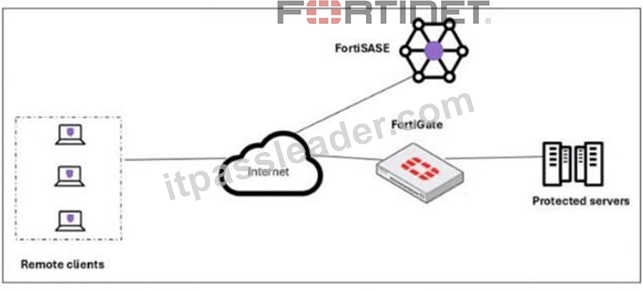
In this scenario, which two setups will achieve these requirements? (Choose two answers)
- A. Configure ZTNA tags on FortiGate.
- B. Configure FortiGate as a zero trust network access (ZTNA) access proxy.
- C. Configure ZTNA servers and ZTNA policies on FortiGate.
- D. Configure private access policies on FortiSASE with ZTNA.
Answer: B,C
Explanation:
To implement Zero Trust Network Access (ZTNA) where a FortiGate hub enforces device posture and processes traffic directly, specific architectural and configuration steps are required on the FortiGate appliance.
* ZTNA Access Proxy (B): The FortiGate must be configured as a ZTNA access proxy. In this role, the FortiGate acts as a secure gateway that mediates connections between remote users and internal applications. This setup ensures that all TCP traffic is intercepted and processed by the FortiGate, providing a direct, shortest-path connection that bypasses the FortiSASE cloud PoPs for the data plane.
* ZTNA Servers and Policies (C): Within the FortiGate configuration, administrators must define ZTNA servers (which identify the protected applications or resources) and ZTNA policies. ZTNA policies are the enforcement rules that check for valid client certificates and specific ZTNA tags (synchronized from FortiSASE) before allowing access to a resource. This configuration allows the FortiGate to perform continuous posture checks on every session.
* Posture Check Mechanism: While ZTNA tags are used, they are generally synchronized from the FortiSASE Endpoint Management Service (EMS) rather than manually configured on the FortiGate itself. This synchronization ensures the FortiGate has real-time visibility into the security posture (e.g., AV compliance, OS version) of the endpoints as reported by FortiClient.
* Analysis of Incorrect Options:
* Option A: Creating ZTNA tags manually on a FortiGate is technically possible but is not the recommended "setup" in a FortiSASE deployment, as tags are meant to be dynamically assigned by EMS and synced to the fabric.
* Option D: "Private access policies on FortiSASE" refers to the SD-WAN Secure Private Access (SPA) use case. In the SD-WAN SPA model, traffic is steered through the FortiSASE PoP first, whereas the requirement specifically asks for TCP traffic to be processed by the FortiGate using ZTNA.
NEW QUESTION # 29
Which role does FortiSASE play in supporting zero trust network access (ZTNA) principles9
- A. It can identify attributes on the endpoint for security posture check.
- B. It integrates with software-defined network (SDN) solutions.
- C. It enables VPN connections for remote employees.
- D. It offers hardware-based firewalls for network segmentation.
Answer: A
Explanation:
FortiSASE supports zero trust network access (ZTNA) principles by identifying attributes on the endpoint for security posture checks. ZTNA principles require continuous verification of user and device credentials, as well as their security posture, before granting access to network resources.
* Security Posture Check:
* FortiSASE can evaluate the security posture of endpoints by checking for compliance with security policies, such as antivirus status, patch levels, and configuration settings.
* This ensures that only compliant and secure devices are granted access to the network.
* Zero Trust Network Access (ZTNA):
* ZTNA is based on the principle of "never trust, always verify," which requires continuous assessment of user and device trustworthiness.
* FortiSASE plays a crucial role in implementing ZTNA by performing these security posture checks and enforcing access control policies.
References:
FortiOS 7.6 Administration Guide: Provides information on ZTNA and endpoint security posture checks.
FortiSASE 23.2 Documentation: Details on how FortiSASE implements ZTNA principles.
NEW QUESTION # 30
What are two benefits of deploying secure private access (SPA) with SD-WAN? (Choose two answers)
- A. ZTNA posture check performed by the hub FortiGate
- B. A direct access proxy tunnel from FortiClient to the on-premises FortiGate
- C. Inline security inspection by FortiSASE
- D. Support of both TCP and UDP applications
Answer: C,D
Explanation:
According to the NSE7 SASE Enterprise Guide (Pages 46 & 61), deploying Secure Private Access (SPA) with SD-WAN provides advanced security and networking capabilities by routing traffic through global Points of Presence (PoPs).
* Inline Security Inspection (D): A major advantage of this approach is that traffic is routed through FortiSASE PoPs before it reaches private applications. This enables inline security inspection, providing robust protection against threats by applying the full SASE security stack-including antivirus, intrusion prevention, and deep packet inspection-to private access traffic.
* Support for TCP and UDP (B): Organizations with existing FortiGate SD-WAN deployments benefit from broader and seamless access to privately hosted applications. The SD-WAN SPA use case explicitly supports both TCP- and UDP-based applications, ensuring that legacy or specialized services that rely on UDP function correctly over the secure tunnel.
* SD-WAN Optimization: This method leverages the benefits of SD-WAN to optimize traffic flow between the SASE PoP and the corporate SD-WAN hub or data center FortiGate. It is particularly useful for mission-critical applications that require an extra layer of security combined with path optimization.
* Architecture: In this configuration, the FortiSASE Security PoPs act as spokes in the organization's SD-WAN network, relying on IPsec VPN overlays and BGP for secure dynamic routing.
While ZTNA posture checks are a feature of the broader ecosystem, the NSE7 Guide specifically highlights inline inspection and application support (TCP/UDP) as primary advantages of the SD-WAN integrated SPA approach.
NEW QUESTION # 31
Which statement best describes the Digital Experience Monitor (DEM) feature on FortiSASE?
- A. It gathers all the vulnerability information from all the FortiClient endpoints.
- B. It monitors the FortiSASE POP health based on ping probes.
- C. It provides end-to-end network visibility from all the FortiSASE security PoPs to a specific SaaS application.
- D. It is used for performing device compliance checks on endpoints.
Answer: C
Explanation:
The Digital Experience Monitor (DEM) in FortiSASE measures and monitors network performance from the FortiSASE Points of Presence (PoPs) to specific SaaS or cloud applications, helping identify and troubleshoot performance issues across the service path.
NEW QUESTION # 32
......
Fortinet NSE7_SSE_AD-25 Exam Syllabus Topics:
| Topic | Details |
|---|---|
| Topic 1 |
|
| Topic 2 |
|
| Topic 3 |
|
| Topic 4 |
|
NSE7_SSE_AD-25 Sample with Accurate & Updated Questions: https://www.itpassleader.com/Fortinet/NSE7_SSE_AD-25-dumps-pass-exam.html
NSE7_SSE_AD-25 Exam Info and Free Practice Test | ITPassLeader: https://drive.google.com/open?id=12as4fhuWx8C2hZPyrIrDNDTdh2vMGhey