

Provide Valid NS0-094 Dumps To Help You Prepare For NetApp Hardware Support Engineer Professional Exam Exam Sep 04, 2026
Network Appliance NS0-094 Dumps Questions [2026] Pass for NS0-094 Exam
NEW QUESTION # 72
Which two factors can increase the chances of experiencing a NetApp WAFL inconsistency on an aggregate? (Choose two.)
- A. constantly running at high load
- B. ignoring NetApp Active IQ health risks
- C. using outdated disk firmware
- D. upgrading frequently
Answer: B,C
Explanation:
A). Ignoring NetApp Active IQ health risks
NetApp Active IQ provides proactive monitoring and alerts for system health risks, including risks related to WAFL inconsistencies. Ignoring these alerts can lead to unresolved issues such as metadata corruption, hardware failures, or system misconfigurations, increasing the chances of WAFL inconsistencies.
Examples of Active IQ Risks:
Disk health warnings.
High write latency or metadata bottlenecks.
Aggregates running out of space.
C). Using outdated disk firmware
Outdated disk firmware can cause performance issues, drive failures, or incorrect handling of I/O operations, potentially leading to WAFL inconsistencies. Disk firmware updates often include fixes for critical issues that improve reliability and prevent data corruption.
Importance:
Keeping firmware updated ensures compatibility with ONTAP and minimizes risks of disk-level errors that can propagate to WAFL.
NEW QUESTION # 73
Which two statements are correct when describing L1 and L2 Watch Dog Resets (WDR)?
(Choose two.)
- A. L1 WDR performs a soft reset.
- B. L2 WDR is initiated after 2 seconds from the event.
- C. L2 WDR requests creation of a core dump before reset.
- D. L1 WDR is initiated after 0.5 seconds from the event.
Answer: B,C
Explanation:
1. L1 Watchdog Reset (WDR):
Description:
L1 WDR is a hardware-initiated reset that occurs when the system detects an unrecoverable error or lockup lasting 0.5 seconds.
Key Characteristics:
It performs a hard reset, meaning the system immediately reboots without creating a core dump.
2. L2 Watchdog Reset (WDR):
Description:
L2 WDR is initiated when the system fails to recover from a critical fault after 2 seconds.
Key Characteristics:
It requests a core dump to capture the system state for diagnostic purposes before performing a reset.
NEW QUESTION # 74
During which two operations is the NVRAM replayed by the high-availability (HA) partner?
(Choose two.)
- A. during a negotiated takeover
- B. when a node is halted
- C. after triggering a sync core
- D. when the node loses power
Answer: A,D
NEW QUESTION # 75
You have been tasked with performing a nondisruptive controller upgrade on a 4-node cluster.
Which initial step is taken prior to the upgrade?
- A. Validate the cluster's health with NetApp Active IQ Config Advisor.
- B. Reboot the entire cluster simultaneously.
- C. Unassign disk ownership from the controllers before shutting them down.
- D. Force a manual takeover of all HA partners at once.
Answer: A
Explanation:
Before performing a nondisruptive controller upgrade, the cluster health and configuration must be validated to ensure there are no existing issues that could affect the upgrade process. NetApp Active IQ Config Advisor is commonly used for this precheck validation.
NEW QUESTION # 76
After upgrading a system to a new NetApp ONTAP software release, the system indicates issues with the boot device. The customer needs to restore the configuration from the running system.
Which two steps must be performed to recover the boot media? (Choose two.)
- A. From the boot menu, choose (4)Clean configuration and initialize all disks.
- B. Configure the system for netboot.
- C. Set the loader parameter bootarg.init.clearvarfsnvram to false.
- D. From the boot menu, choose (7)Install new software first.
Answer: B,D
Explanation:
Recovering failed boot media requires configuring the system for netboot so the replacement boot device can boot and access the ONTAP image. From the boot menu, the option to install new software is used to load the ONTAP software onto the new boot media before restoring the configuration from the running cluster.
NEW QUESTION # 77
A newly installed shelf shows one SAS path as down while multipath HA is enabled. What is the MOST likely result if another path fails?
- A. No impact because single-path is recommended
- B. Loss of storage redundancy and potential access disruption
- C. Automatic disk encryption activation
- D. Controller firmware rollback
Answer: B
Explanation:
Multipath HA relies on redundant SAS connectivity. If one path is already down, a second path failure may eliminate storage access redundancy and disrupt aggregate availability. Single-path configurations are not preferred for enterprise resiliency. Encryption and firmware rollback functions are unrelated to SAS path failures.
NEW QUESTION # 78
Which of the following scenarios could result in a NetApp WAFL inconsistency in a RAID DP aggregate?
- A. both party disks failing
- B. rebooting a node during a disk reconstruction
- C. two disks failing and a block error during reconstruction
- D. two disks failing within seconds of each other
Answer: C
Explanation:
A NetApp WAFL (Write Anywhere File Layout) inconsistency in a RAID-DP aggregate could occur in the following scenarios:
1. Two disks failing and a block error during reconstruction
Why this causes inconsistency:
RAID-DP is designed to handle up to two concurrent disk failures. However, if a block error occurs during the reconstruction process (e.g., unreadable data on the surviving disks), the RAID group cannot rebuild the lost data, leading to WAFL inconsistencies.
2. Two disks failing within seconds of each other
Why this causes inconsistency:
If two disks in the same RAID group fail nearly simultaneously (before the RAID-DP can reconstruct data from the first failed disk), the system cannot recover the data, resulting in WAFL inconsistencies.
NEW QUESTION # 79
You notice the following system alert during a routine check of a four-node NetApp ONTAP cluster: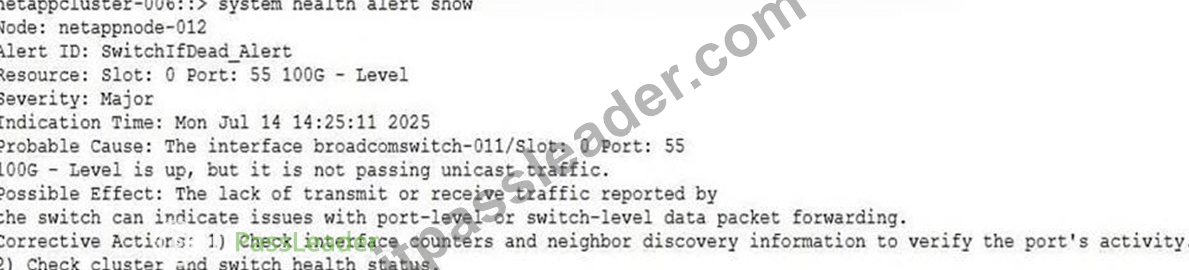
The customer confirms that the cables are connected correctly and interface LEDs on the switches are on.
What is the next step in troubleshooting this issue?
- A. Bounce the cluster interconnect ports on the ONTAP cluster nodes that are reporting this alert.
- B. Verify the configuration of the switchports with the output of RCF Configurator.
- C. Remove the cluster ports from the cluster IPspace and cluster broadcast domain, and delete the health alerts.
- D. Revert the ONTAP software upgrade to see if the alert disappears.
Answer: B
Explanation:
The alert indicates that the switch port is physically up but not passing unicast traffic, which commonly points to a switch port configuration mismatch. Verifying the switch port configuration against the RCF Configurator output is the appropriate next troubleshooting step.
NEW QUESTION # 80
You are performing a head swap to upgrade your NetApp ONTAP controllers. After completing the first controller upgrade, the new controller does not show any cluster ports, and the new controller cannot communicate with the rest of the cluster. You verified that the new controller is cabled correctly, and swapped the cables, yet the ports still do not show. Which action resolves the issue and enables the new controller to communicate with the cluster?
- A. Create new network ports, then create new cluster interfaces and add them to the cluster broadcast domain.
- B. Modify the network ports, and modify the cluster interfaces to the cluster broadcast domain.
- C. Create new cluster interfaces, and add the interfaces to the cluster broadcast domain.
- D. Modify the cluster interfaces, and add the interfaces to the cluster broadcast domain.
Answer: D
Explanation:
During a head swap, the new controller may have different physical cluster port names. The existing cluster LIFs must be modified to use the new ports, and those ports must belong to the cluster broadcast domain so the controller can communicate with the cluster.
NEW QUESTION # 81
A system is in a boot loop, and the following error is reported:
PANIC: Root volume is restricted. in SK process config_thread on
release 9.16.1P5 (C) on Fri Aug 1 22:15:30 GMT 2025
What action do you take to resolve the issue?
- A. Replace the boot media.
- B. Boot without /etc/rc.
- C. Perform wafliron from the boot menu.
- D. Perform a system reset backup from the Service Processor.
Answer: C
Explanation:
The panic indicates an issue with the root volume state or WAFL consistency. Running wafliron from the boot menu repairs filesystem inconsistencies on the root volume and is the appropriate recovery action for this condition.
NEW QUESTION # 82
Which statement best describes the functionality of RAID Error Propagation (REP)?
- A. An unrecoverable error on a user data block does not trigger a NetApp WAFL inconsistency.
- B. An unrecoverable error on a user data block triggers a NetApp WAFL inconsistency.
- C. A recoverable error on a user data block triggers a NetApp WAFL inconsistency.
- D. An unrecoverable error on a metadata block does not trigger a NetApp WAFL inconsistency.
Answer: A
Explanation:
Functionality of RAID Error Propagation (REP):
RAID Error Propagation (REP) ensures that errors on the disk layer, such as unrecoverable read errors, do not propagate as inconsistencies into the WAFL (Write Anywhere File Layout) metadata layer.
WAFL is designed to manage data blocks, and if an error occurs on a user data block, WAFL can identify and handle it gracefully without flagging an inconsistency.
Why Option A Is Correct:
REP ensures that errors on a user data block are isolated and do not trigger WAFL inconsistencies.
Instead, the error is handled at the RAID layer or higher without corrupting metadata.
This design provides a robust mechanism to protect against data integrity issues caused by disk errors.
NEW QUESTION # 83
You have just completed a controller swap on your cluster. At the end of the process, you are directed to verify the storage using the debug vreport showcommand.
You run the command and see the following output: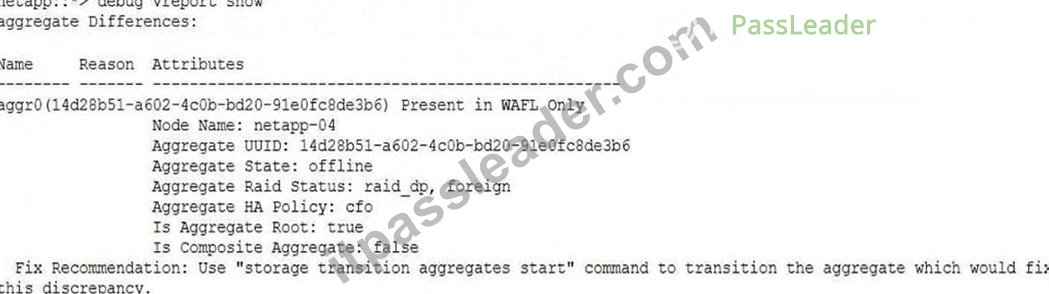
Based on the output, which action do you take?
- A. Use the debug vreport fix -type aggregate command.
- B. Use the storage aggregate delete command.
- C. Use the storage aggregate remove-stale-record command.
- D. Use the storage transition aggregates start command (the fix recommendation).
Answer: D
Explanation:
The vreport output explicitly identifies the aggregate as present only in WAFL after a controller swap and recommends running storage transition aggregates start to transition the aggregate and fix the discrepancy.
NEW QUESTION # 84
A customer calls you because some of their disks have failed. Looking at the system, you see the following output: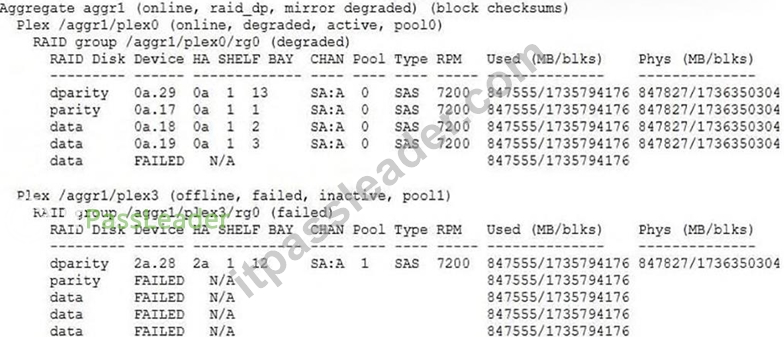
What impact can the customer expect on their production workloads?
- A. All volumes on aggr1 will be inaccessible.
- B. After running the wafl_check command, the data will be accessible again.
- C. Some volumes on aggr1 will be inaccessible.
- D. All data on aggr1 will stay accessible.
Answer: D
Explanation:
The aggregate is mirrored, and one plex remains online and active. Even though the mirror is degraded because the other plex has failed, production data remains accessible from the surviving plex.
NEW QUESTION # 85
Which two tools can you use to invoke AutoSupport? (Choose two.)
- A. the SmartSolve tool
- B. NetApp Cloud Insights
- C. CLI
- D. the NetApp Active IQ website
Answer: C,D
Explanation:
To invoke AutoSupport in ONTAP, the following tools can be used:
1. CLI (Command Line Interface)
How to use:
Run the command:
python
Copy code
autosupport invoke -node <nodename> -type all
This triggers AutoSupport to collect and send logs and system information.
2. NetApp Active IQ website
How to use:
Log in to the Active IQ portal and use its interface to request an AutoSupport message from the connected ONTAP systems.
NEW QUESTION # 86
Which statement BEST describes the purpose of Active IQ in a NetApp environment?
- A. It physically repairs failed hardware automatically
- B. It manages third-party hypervisors only
- C. It provides predictive analytics and operational insights
- D. It replaces ONTAP licensing servers
Answer: C
Explanation:
NetApp Active IQ provides predictive analytics, risk detection, capacity planning insights, and operational recommendations for NetApp systems. It enhances proactive support and system optimization. Active IQ does not physically repair hardware or function solely as a licensing or hypervisor management platform.
NEW QUESTION # 87
How do you set environment variables to factory settings?
- A. wipeconfig
- B. setenv factory
- C. set-defaults
- D. unsetenv all
Answer: C
Explanation:
To reset environment variables to factory settings, the set-defaults command is used. This command clears all customizations and restores the environment variables to their default values.
Key Details:
Command Syntax:
At the LOADER prompt, type:
arduino
Copy code
set-defaults
Effect:
This command resets all environment variables (e.g., boot arguments, diagnostic settings) to their original factory defaults.
NEW QUESTION # 88
You have identified that the file named quarterly_25.docx is inconsistent. Which nodeshell command reports whether there are Snapshot copies available?
- A. "priv set advanced; file check -f quarterly_25.docx"
- B. "priv set advanced; aggr wafliron start -f quarterly_25.docx"
- C. "priv set diag; file check -v <voiname> -i <field>"
- D. "priv set diag; snap list -f quarterly_25.docx"
Answer: C
NEW QUESTION # 89
Which two commands confirm whether an aggregate is WAFL inconsistent? (Choose two.)
- A. wafiron show <aggregate>
- B. storage aggregate show
- C. node run -node <node> sysconfig -a
- D. node run -node <node> sysconfig -r
Answer: A,D
Explanation:
To determine whether an aggregate is WAFL (Write Anywhere File Layout) inconsistent, the following two commands can be used:
1. wafiron show <aggregate>
What it does:
This command directly checks the WAFL consistency status of the specified aggregate. If an aggregate is WAFL inconsistent, it will report the inconsistency in the output.
How to use:
Run the command: wafiron show <aggregate> (replace <aggregate> with the name of the aggregate). Look for indications of WAFL inconsistency in the output.
Why it's relevant:
The wafiron utility is specifically designed to provide WAFL status and diagnostics. It is the most accurate and direct way to confirm whether an aggregate is inconsistent.
2. node run -node <node> sysconfig -r
What it does:
This command displays RAID information for all aggregates on the specified node. If an aggregate is WAFL inconsistent, it will be explicitly mentioned in the output.
How to use:
Run the command: node run -node <node> sysconfig -r.
Check the output for the phrase "WAFL inconsistent" under the corresponding aggregate.
Why it's relevant:
This command provides additional context, such as the RAID group details, which can help understand whether the inconsistency is isolated or part of a larger issue.
NEW QUESTION # 90
A SAS connection is reporting a single PHY down. What are the two most likely causes? (Choose two.)
- A. outdated I/O module (IOM) firmware
- B. defective cable
- C. an offline shelf in the stack
- D. improperly seated cable
Answer: B,D
Explanation:
Understanding a Single PHY Down Issue:
In SAS environments, a PHY represents a physical layer connection between devices.
When a single PHY reports a "down" status, it typically indicates an issue with the physical connectivity or the associated hardware.
Cause 1: Improperly Seated Cable
If the SAS cable is not properly seated in the port, the connection for one or more PHYs may fail.
Reseating the cable on both ends (controller and shelf) often resolves the issue.
Cause 2: Defective Cable
A damaged or faulty SAS cable can cause PHY errors.
Replacing the cable and verifying the connection resolves the issue in this case.
NEW QUESTION # 91
What are two valid commands that can be used to trigger an AutoSupport? (Choose two.)
- A. ::> autosupport invoke-core-upload -node <nodename>
- B. ::> autosupport history show-upload-details -node <nodename>
- C. ::> autosupport invoke -node <nodename> -type all
- D. ::> system node coredump upload -node <nodename>
Answer: A,C
Explanation:
To trigger an AutoSupport message in ONTAP, the following commands are valid:
1. ::> autosupport invoke -node <nodename> -type all
What it does:
This command manually triggers a complete AutoSupport message of type "all." This includes logs and system information from all subsystems.
How to use:
Run the command: autosupport invoke -node <nodename> -type all Replace <nodename> with the name of the node for which you want to generate the AutoSupport message.
Why it's relevant:
This is the primary method for triggering a full AutoSupport message manually. It is commonly used during troubleshooting to provide comprehensive system data to NetApp Support.
2. ::> autosupport invoke-core-upload -node <nodename>
What it does:
This command is specifically used to upload core files (e.g., kernel or user space cores) from a node to NetApp Support for analysis.
How to use:
Run the command: autosupport invoke-core-upload -node <nodename>. Replace <nodename> with the name of the node for which you want to upload core files.
Why it's relevant:
If there is a system panic or other critical issue, this command ensures that core files are included in the AutoSupport message for detailed analysis.
NEW QUESTION # 92
Which two steps are required to replace a drawer in a DS460c shelf? (Choose two.)
- A. Power off the shelf.
- B. Shut down both nodes.
- C. Evacuate all drives in the drawer.
- D. Disconnect the cable chains from the chassis.
Answer: C,D
Explanation:
To replace a drawer in a DS460c shelf, the following steps must be taken:
1. Disconnect the cable chains from the chassis
Why this is required:
Cable chains connect the drawer to the shelf and must be disconnected to safely remove the drawer.
2. Evacuate all drives in the drawer
Why this is required:
Drives must be removed to avoid damage during the drawer replacement process and to reduce the weight of the drawer for safe handling.
NEW QUESTION # 93
A customer observes that one node repeatedly enters takeover mode due to thermal alarms.
Which FRU should be inspected FIRST?
- A. Cluster passwords
- B. Shelf serial numbers
- C. Power cable labels
- D. Cooling fans and airflow obstructions
Answer: D
Explanation:
Thermal alarms are commonly associated with failed cooling fans, blocked airflow, or improper rack ventilation. Inspecting cooling-related FRUs is the highest priority. Shelf serial numbers and passwords are unrelated to thermal conditions. Continued overheating may eventually force protective node shutdowns.
NEW QUESTION # 94
......
Achieve Success in Actual NS0-094 Exam NS0-094 Exam Dumps: https://www.itpassleader.com/NetworkAppliance/NS0-094-dumps-pass-exam.html
Updated Network Appliance Study Guide NS0-094 Dumps Questions: https://drive.google.com/open?id=1RNWSEVt3tA-xSWqJYVoME2XfaxKfxcA7