

RedHat EX200 Certification Exam Dumps with 136 Practice Test Questions
New EX200 Exam Dumps with High Passing Rate
Preparing for the EX200 exam requires a thorough understanding of Linux fundamentals and hands-on experience with Red Hat Enterprise Linux. Candidates can prepare for the exam by taking training courses offered by Red Hat or by using self-study materials. EX200 exam is challenging, and candidates should be prepared to invest time and effort in their preparation.
NEW QUESTION # 81
Which of the log messages below matches the following Logstash grok filter?
grok {
match => ["message", "%{SYSLOGBASE} new node %{IPORHOST:node}" ]
}
- A. Jun 30 00:36:49 headnode:
new node 198.51.100.103 at clustermanager:12353 - B. Jun 30 00:36:49 headnode clustermanager[12353]: new node 198.51.100.103
- C. clustermanager[12353]: Jun 30 00:36:49 headnode new node 198.51.100.103
- D. Jun 30 00:36:49 headnode clustermanager[198.51.100.103]: new node
- E. %{SYSLOG-FROM:headnode clustermanager[12353]} new node 198.51.100.103
Answer: D
NEW QUESTION # 82
Your System is configured in 192.168.0.0/24 Network and your nameserver is 192.168.0.254. Make successfully resolve to server1.example.com.
Answer:
Explanation:
see explanation below.
Explanation
nameserver is specified in question,
1. Vi /etc/resolv.conf
nameserver 192.168.0.254
2. host server1.example.com
NEW QUESTION # 83
You are new System Administrator and from now you are going to handle the system and your main task is Network monitoring, Backup and Restore. But you don't know the root password. Change the root password to redhat and login in default Runlevel.
Answer:
Explanation:
When you Boot the System, it starts on default Runlevel specified in /etc/inittab:
Id:?:initdefault:
When System Successfully boot, it will ask for username and password. But you don't know the root's password. To change the root password you need to boot the system into single user mode. You can pass the kernel arguments from the boot loader.
1. Restart the System.
2. You will get the boot loader GRUB screen.
3. Press a and type 1 or s for single mode ro root=LABEL=/ rhgb queit s
4. System will boot on Single User mode.
5. Use passwd command to change.
6. Press ctrl+d
NEW QUESTION # 84
Part 1 (on Node1 Server)
Task 17 [Accessing Linux File Systems]
Find all the files owned by user "alex" and redirect the output to /home/alex/files.
Answer:
Explanation:
* root@node1 ~]# find / -user alex -type f > /home/alex/files
NEW QUESTION # 85
Configure autofs.
Configure the autofs automatically mount to the home directory of LDAP, as required:
server.domain11.example.com use NFS to share the home to your system. This file system contains a pre configured home directory of user ldapuserX.
Home directory of ldapuserX is:
server.domain11.example.com /home/guests/ldapuser
Home directory of ldapuserX should automatically mount to the ldapuserX of the local /home/guests Home directory's write permissions must be available for users ldapuser1's password is password
Answer:
Explanation:
see explanation below.
Explanation
yum install -y autofs
mkdir /home/rehome
* /etc/auto.master
/home/rehome/etc/auto.ldap
Keep then exit
cp /etc/auto.misc /etc/auto.ldap
* /etc/auto.ldap
ldapuserX -fstype=nfs,rw server.domain11.example.com:/home/guests/
Keep then exit
systemctl start autofs
systemctl enable autofs
su - ldapuserX// test
If the above solutions cannot create files or the command prompt is -bash-4.2$, it maybe exist multi-level directory, this needs to change the server.domain11.example.com:/home/guests/ to server.domain11.example.com:/home/guests/ldapuserX. What is multi-level directory? It means there is a directory of ldapuserX under the /home/guests/ldapuserX in the questions. This directory is the real directory.
NEW QUESTION # 86
Configure a task: plan to run echo "file" command at 14:23 every day.
Answer:
Explanation:
see explanation below.
Explanation
(a) Created as administrator
# crontab -u natasha -e
23 14 * * * /bin/echo "file"
(b)Created as natasha
# su - natasha
$ crontab -e
23 14 * * * /bin/echo "file"
NEW QUESTION # 87
There are two different networks 192.168.0.0/24 and 192.168.1.0/24. Where 192.168.0.254 and
192.168.1.254 IP Address are assigned on Server. Verify your network settings by pinging 192.168.1.0/24 Network's Host.
Answer:
Explanation:
vi /etc/sysconfing/network NETWORKING=yes HOSTNAME=station?.example.com GATEWAY=192.168.0.254 service network restart
2.vi /etc/sysconfig/network-scripts/ifcfg-eth0 DEVICE=eth0
ONBOOT=yes
BOOTPROTO=static
IPADDR=X.X.X.X
NETMASK=X.X.X.X
GATEWAY=192.168.0.254
ifdown eth0
ifup eth0
NEW QUESTION # 88
SIMULATION
There is a local logical volumes in your system, named with common and belong to VGSRV volume group, mount to the /common directory. The definition of size is 128 MB.
Requirement:
Extend the logical volume to 190 MB without any loss of data. The size is allowed between 160-160 MB after extending.
Answer:
Explanation:
See explanation below.
Explanation/Reference:
Explanation: lvextend -L 190M /dev/mapper/vgsrv-common resize2fs /dev/mapper/vgsrv-common
NEW QUESTION # 89
Configure the verification mode of your host account and the password as LDAP. And it can login successfully through ldapuser40. The password is set as "password".
And the certificate can be downloaded from http://ip/dir/ldap.crt. After the user logs on the user has no host directory unless you configure the autofs in the following questions.
Answer:
Explanation:
see explanation below.
Explanation
system-config-authentication
LDAP Server: ldap//instructor.example.com (In domain form, not write IP) OR
# yum groupinstall directory-client (1.krb5-workstation 2.pam-krb5 3.sssd)
# system-config-authentication
1.User Account Database: LDAP
2.LDAP Search Base DN: dc=example,dc=com
3.LDAP Server: ldap://instructor.example.com (In domain form, not write IP) 4.Download CA Certificate
5.Authentication Method: LDAP password
6.Apply
getent passwd ldapuser40
NEW QUESTION # 90
CORRECT TEXT
Configure a HTTP server, which can be accessed through http://station.domain40.example.com.
Please download the released page from http://ip/dir/example.html.
Answer:
Explanation:
# yum install -y httpd
# chkconfig httpd on
# cd /var/www/html
# wget http://ip/dir/example.html
# cp example.com index.html
# vim /etc/httpd/conf/httpd.conf
NameVirtualHost 192.168.0.254:80
<VirtualHost 192.168.0.254:80>
DocumentRoot /var/www/html/
ServerName station.domain40.example.com
</VirtualHost>
NEW QUESTION # 91
SIMULATION
According the following requirements to create user, user group and the group members:
- A group named admin.
- A user named mary, and belong to admin as the secondary group.
- A user named alice, and belong to admin as the secondary group.
- A user named bobby, bobby's login shell should be non-interactive. Bobby not belong to admin as the secondary group.
Mary, Alice, bobby users must be set "password" as the user's password.
Answer:
Explanation:
See explanation below.
Explanation/Reference:
Explanation:
groupadd admin
useradd -G admin mary
useradd -G admin alice
useradd -s /sbin/nologin bobby
echo "password" | passwd --stdin mary
echo "password" | passwd --stdin alice
echo "password" | passwd --stdin bobby
NEW QUESTION # 92
Create a user named alex, and the user id should be 1234, and the password should be alex111.
Answer:
Explanation:
# useradd -u 1234 alex
# passwd alex
alex111
alex111
OR
echo alex111|passwd -stdin alex
NEW QUESTION # 93
Create a logical volume
Create a new logical volume as required:
Name the logical volume as database, belongs to datastore of the volume group, size is 50 PE.
Expansion size of each volume in volume group datastore is 16MB.
Use ext3 to format this new logical volume, this logical volume should automatically mount to /mnt/database
Answer:
Explanation:
fdisk -cu /dev/vda// Create a 1G partition, modified when needed
partx -a /dev/vda
pvcreate /dev/vdax
vgcreate datastore /dev/vdax -s 16M
lvcreate- l 50 -n database datastore
mkfs.ext3 /dev/datastore/database
mkdir /mnt/database
mount /dev/datastore/database /mnt/database/ df -Th
vi /etc/fstab
/dev/datastore /database /mnt/database/ ext3 defaults 0 0 mount -a
Restart and check all the questions requirements.
NEW QUESTION # 94
Add users: user2, user3.
The Additional group of the two users: user2, user3 is the admin group Password: redhat
Answer:
Explanation:
# useradd -G admin user2
# useradd -G admin user3
# passwd user2
redhat
# passwd user3
redhat
NEW QUESTION # 95
CORRECT TEXT
Configure autofs to make sure after login successfully, it has the home directory autofs, which is shared as /rhome/ldapuser40 at the ip: 172.24.40.10. and it also requires that, other ldap users can use the home directory normally.
Answer:
Explanation:
# chkconfig autofs on
# cd /etc/
# vim /etc/auto.master
/rhome /etc/auto.ldap
# cp auto.misc auto.ldap
# vim auto.ladp
ldapuser40 -rw,soft,intr 172.24.40.10:/rhome/ldapuser40
* -rw,soft,intr 172.16.40.10:/rhome/&
# service autofs stop
# server autofs start
# showmount -e 172.24.40.10
# su - ladpuser40
NEW QUESTION # 96
Configure your Host Name, IP Address, Gateway and DNS.
Host name: dtop5.dn.ws.com
IP Address: 172.28.10.5/4
Gateway: 172.28.10.1
DNS: 172.28.10.1
Answer:
Explanation:
see explanation below.
Explanation
* Configure Host Name
* vim /etc/sysconfig/network NETWORKING=yes HOSTNAME=dtop5.dn.ws.com
GATEWAY=172.28.10.1
2. Configure IP Address, Gateway and DNS
Configure the network by Network Manager: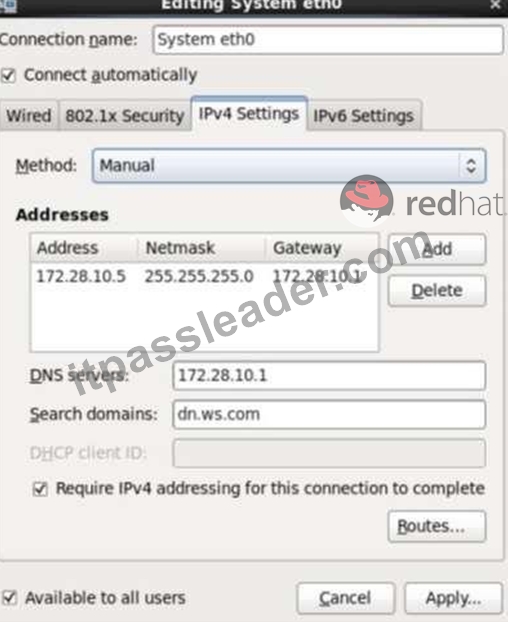
Note: Please remember to choose two options:
* Connect automatically
* Available to all users
Click "Apply", save and exit, and restart your network services:
# Service network restart
3. Validate these profiles:
a) Check gateway: # vim / etc / sysconfig / network
NETWORKING=yes
HOSTNAME=dtop5.dn.ws.com
GATEWAY=172.28.10.1
b) Check Host Name: # vim /etc/hosts
c) Check DNS: # vim /etc/resolv.conf
# Generated by NetworkManager
Search dn.ws.com
Nameserver 172.28.10.1
d) Check Gateway: # vim /etc/sysconfig/network-scripts/ifcfg-eth0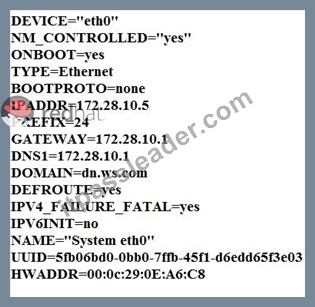
NEW QUESTION # 97
There is a local logical volumes in your system, named with shrink and belong to VGSRV volume group, mount to the /shrink directory. The definition of size is 320 MB.
Requirement:
Reduce the logical volume to 220 MB without any loss of data. The size is allowed between 200-260 MB after reducing.
Answer:
Explanation:
see explanation below.
Explanation
cd;umount /shrink
e2fsck -f /dev/mapper/vgsrv-shrink
resize2fs /dev/mapper/vgsrv-shrink 220M
lvreduce -L 220M /dev/mapper/vgsrv-shrink
mount -a
NEW QUESTION # 98
One Logical Volume named /dev/test0/testvolume1 is created. The initial Size of that disk is 100MB now you required more 200MB. Increase the size of Logical Volume, size should be increase on online.
Answer:
Explanation:
see explanation below.
Explanation
* lvextend -L+200M /dev/test0/testvolume1 Use lvdisplay /dev/test0/testvolume1)
* ext2online -d /dev/test0/testvolume1
lvextend command is used the increase the size of Logical Volume. Other command lvresize command also here to resize. And to bring increased size on online we use the ext2online command.
NEW QUESTION # 99
Configure your NFS services. Share the directory by the NFS Shared services.
Answer:
Explanation:
/etc/init.d/rpcbind start
/etc/init.d/nfslock start
/etc/init.d/nfs start
chkconfig rpcbind on
chkconfig nfslock on
chkconfig nfs on
showmount -e localhost
NEW QUESTION # 100
Create a backup file named /root/backup.tar.bz2, which contains the contents of /usr/local, bar must use the bzip2 compression.
Answer:
Explanation:
cd /usr/local
tar -jcvf /root/backup.tar.bz2*
mkdir /test
tar -jxvf /root/backup.tar.bz2 -C /test/
NEW QUESTION # 101
Open kmcrl value of 5 , and can verify in /proc/ cmdline
Answer:
Explanation:
# vim /boot/grub/grub.conf
kernel/vmlinuz-2.6.32-71.el6.x86_64 ro root=/dev/mapper/GLSvg-GLSrootrd_LVM_LV=GLSvg/GLSroot rd_LVM_LV=GLSvg/GLSswaprd_NO_LUKSrd_NO_MDrd_NO_DM LANG=en_US.UTF-8 SYSFONT=latarcyrheb-sun16 KEYBOARDTYPE=pc KEYTABLE=us crashkernel=auto rhgb quiet kmcrl=5 Restart to take effect and verification:
# cat /proc/cmdline
ro root=/dev/mapper/GLSvg-GLSroot rd_LVM_LV=GLSvg/GLSroot rd_LVM_LV=GLSvg/GLSswap rd_NO_LUKS rd_NO_MD rd_NO_DM LANG=en_US.UTF-8 SYSFONT=latarcyrheb-sun16 KEYBOARDTYPE=pc KEYTABLE=us rhgb quiet kmcrl=5
NEW QUESTION # 102
Which of the following mechanisms are used for service discovery in a container environment? (Choose two
correct answers.)
- A. The container platforms maintains DNS records which point to containers offering a specific service.
- B. The container platform mounts the sockets for all available services into the container's file systems.
- C. The container platform sets environment variables containing service information within the containers.
- D. The container platform lists localhost ports assigned to containers in each container's /etc/servicesfile.
- E. The container platform offers a command like docker service discoverwhich should be run within a
container.
Answer: A,C
NEW QUESTION # 103
Create a volume group, and set 16M as a extends. And divided a volume group containing 50 extends on volume group lv, make it as ext4 file system, and mounted automatically under /mnt/data.
Answer:
Explanation:
see explanation below.
Explanation
# pvcreate /dev/sda7 /dev/sda8
# vgcreate -s 16M vg1 /dev/sda7 /dev/sda8
# lvcreate -l 50 -n lvm02
# mkfs.ext4 /dev/vg1/lvm02
# blkid /dev/vg1/lv1
# vim /etc/fstab
# mkdir -p /mnt/data
UUID=xxxxxxxx /mnt/data ext4 defaults 0 0
# vim /etc/fstab
# mount -a
# mount
(Verify)
NEW QUESTION # 104
SIMULATION
1. Find all sizes of 10k file or directory under the /etc directory, and copy to /tmp/findfiles directory.
2. Find all the files or directories with Lucy as the owner, and copy to /tmp/findfiles directory.
Answer:
Explanation:
See explanation below.
Explanation/Reference:
Explanation:
(1)find /etc -size 10k -exec cp {} /tmp/findfiles \;
(2)find / -user lucy -exec cp -a {} /tmp/findfiles \;
Note: If find users and permissions, you need to use cp - a options, to keep file permissions and user attributes etc.
NEW QUESTION # 105
......
Get EX200 Braindumps & EX200 Real Exam Questions: https://www.itpassleader.com/RedHat/EX200-dumps-pass-exam.html
RedHat EX200 Actual Questions and Braindumps: https://drive.google.com/open?id=1K2o52iiG0su0vM-bZU_gtoz83NkzcPA2